Snapmaker Orca 2.4.1 is released. Key updates in this version include: added Top/Bottom Paint Penetration Layers, Prime Tower optimizations, support optimizations, and some bug fixes.
¶ Download Link
¶ New Features
-
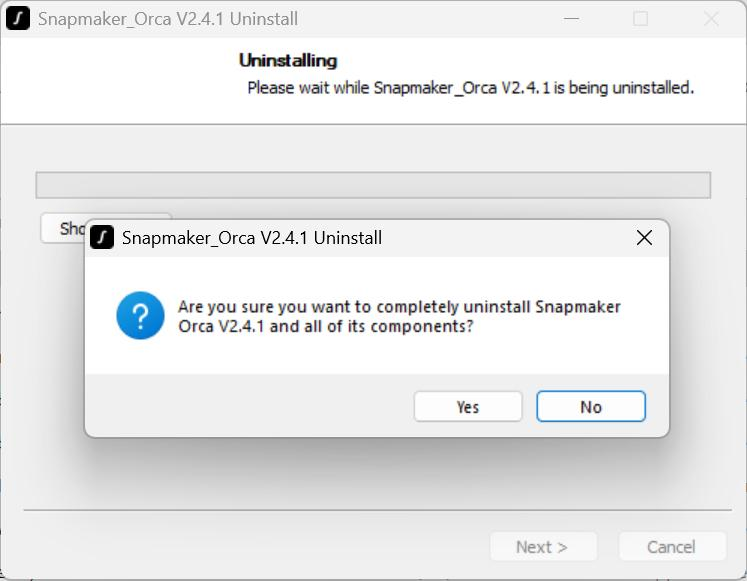
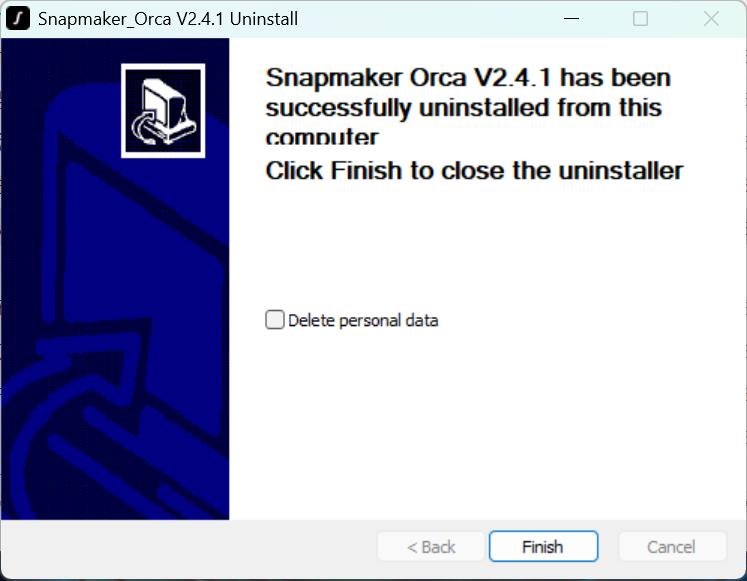
Added a cache clearing option during uninstallation (Windows only). You can choose whether to delete personal data during uninstallation; unchecked by default.
-
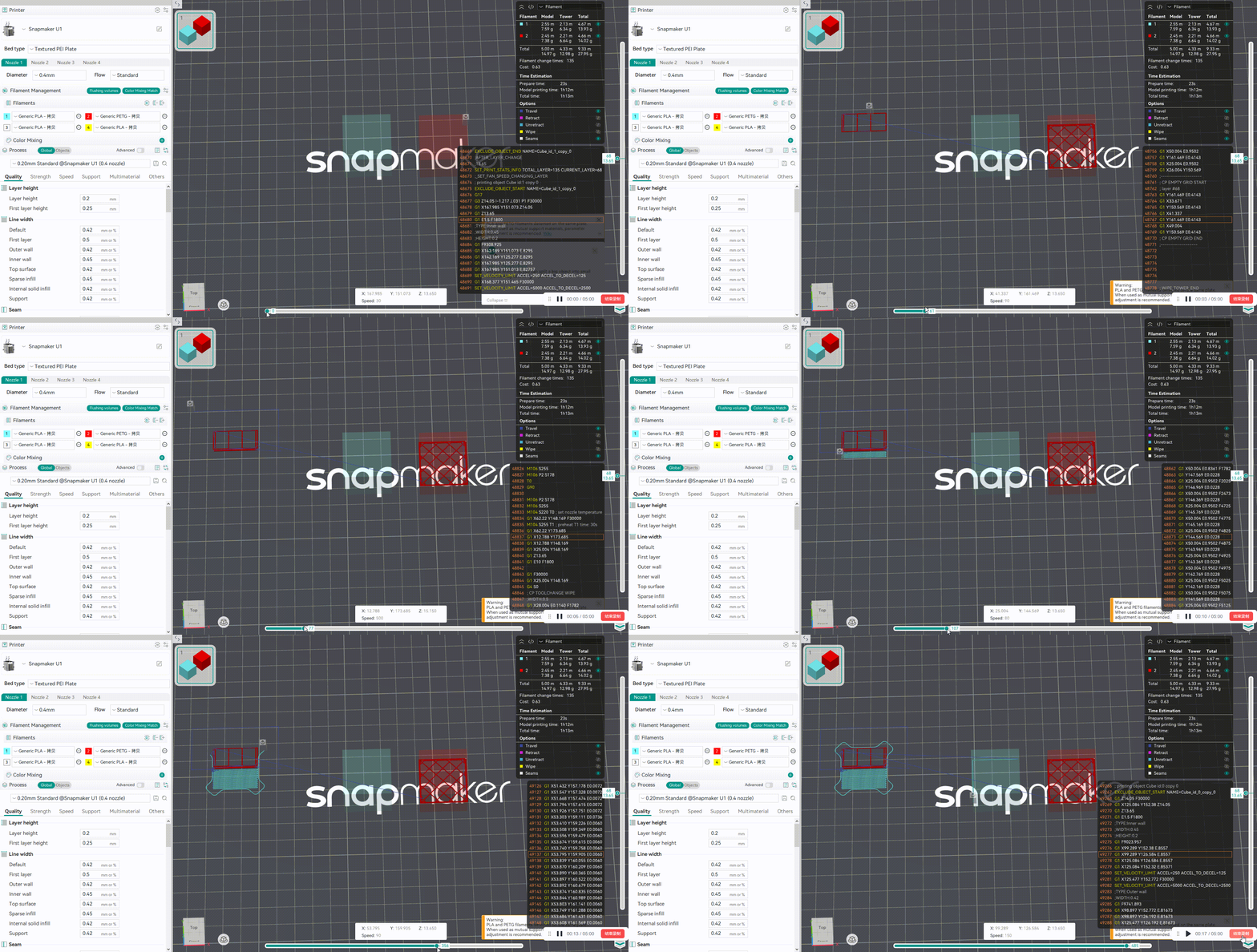
Added a feature where the extruder detours around the Prime Tower and enters through the outer wall opening during tool changes.
-
Added four parameters to the Filament panel:
Interface Layer Pre-extrusion Distance,Interface Layer Pre-extrusion Length,Interface Layer Print Temperature, andAdhesiveness Category(visible in Developer mode).
The Developer Mode can be enabled through
Preferences>Developer mode.
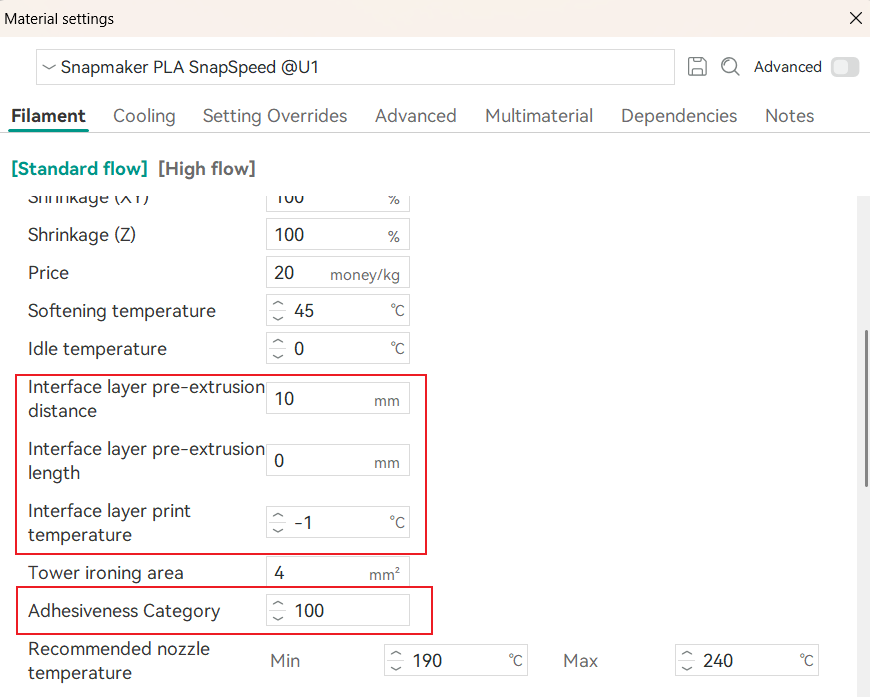
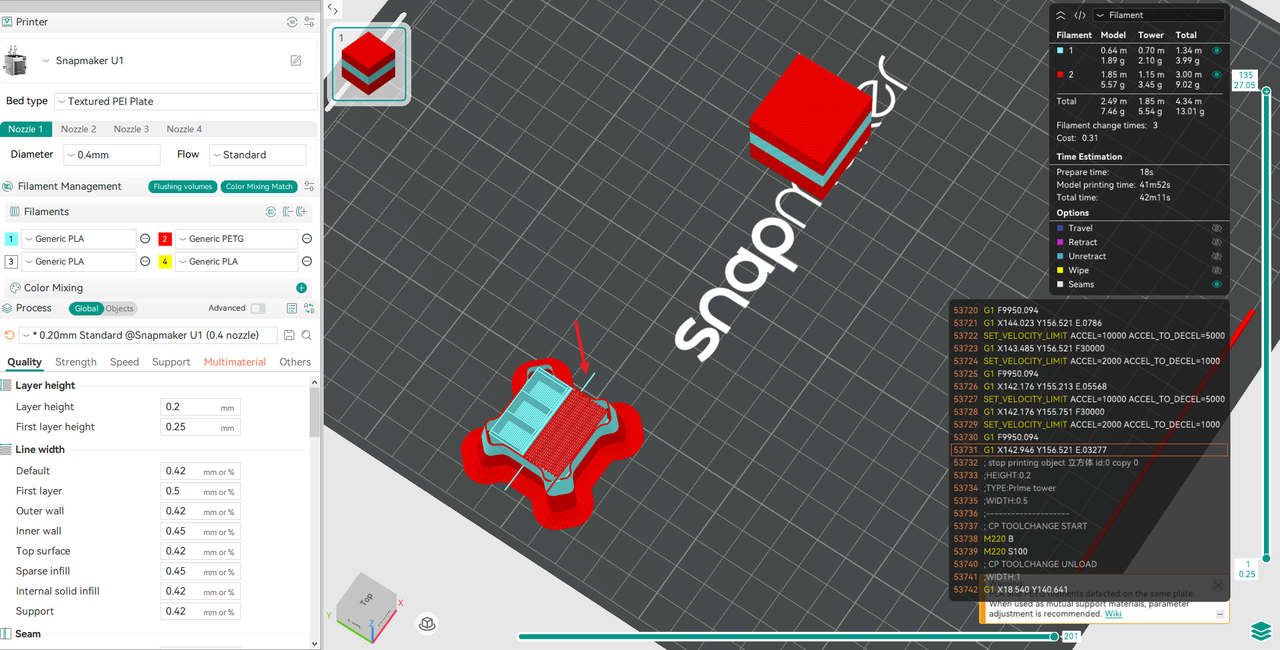
Interface Layer Pre-extrusion Distance
The Interface Layer Pre-extrusion Distance refers to the extra extrusion path executed along the outer edge of the Prime Tower before printing. This increases nozzle pressure to improve the adhesion strength between the interface layer and the Prime Tower.
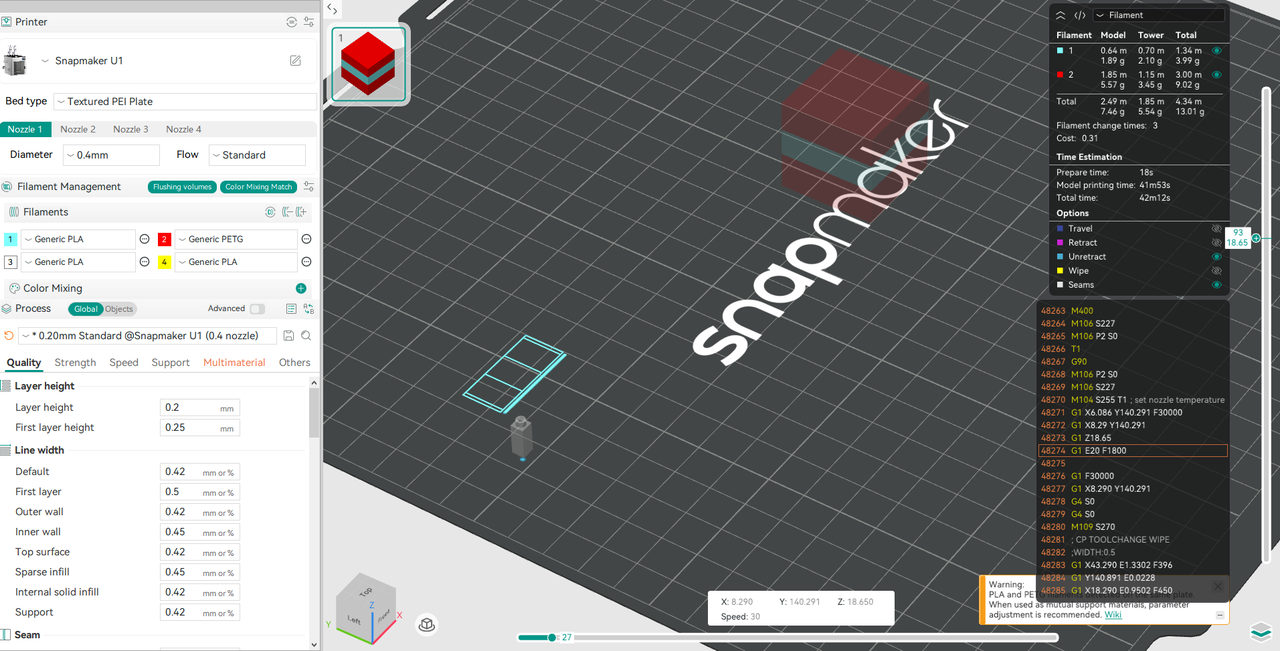
Interface Layer Pre-extrusion Length
The Interface Layer Pre-extrusion Length refers to the extra amount of filament pre-extruded after retraction during loading and before printing the Prime Tower. This increases nozzle pressure to improve adhesion strength between the interface layer and the Prime Tower. For example, if the original filament retraction length is 10 mm and the Interface Layer Pre-extrusion Length is set to 10 mm, the actual retraction value during loading will be the sum of both (20 mm).
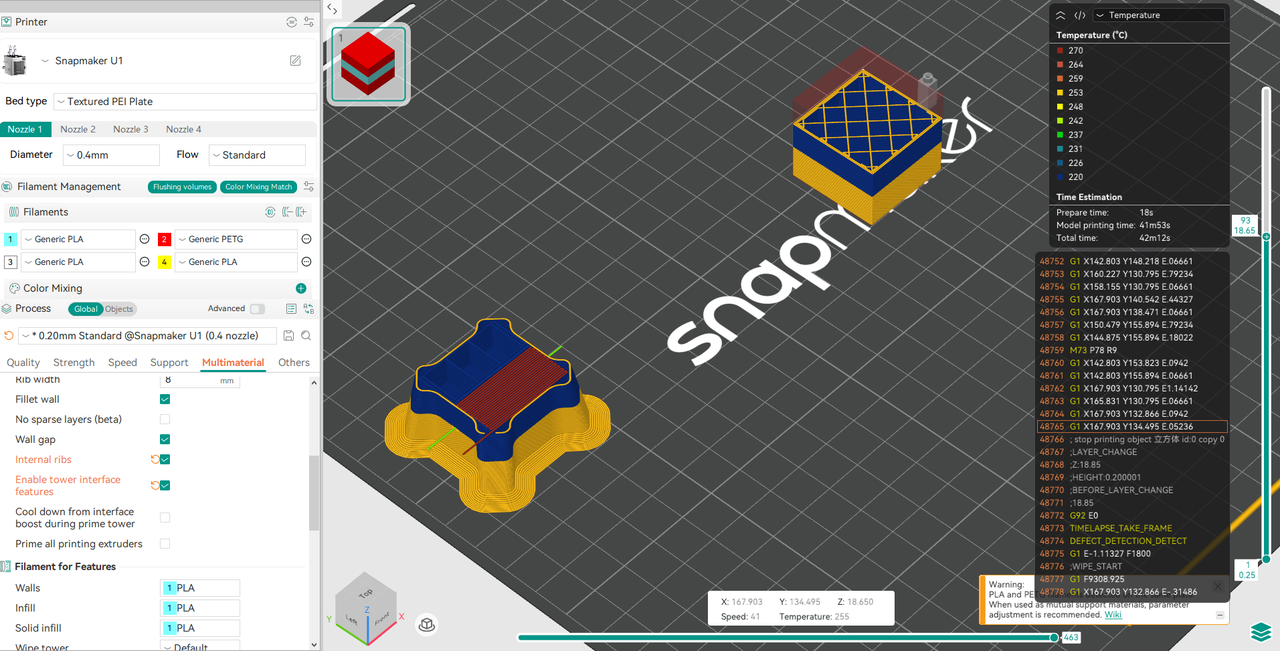
Interface Layer Print Temperature
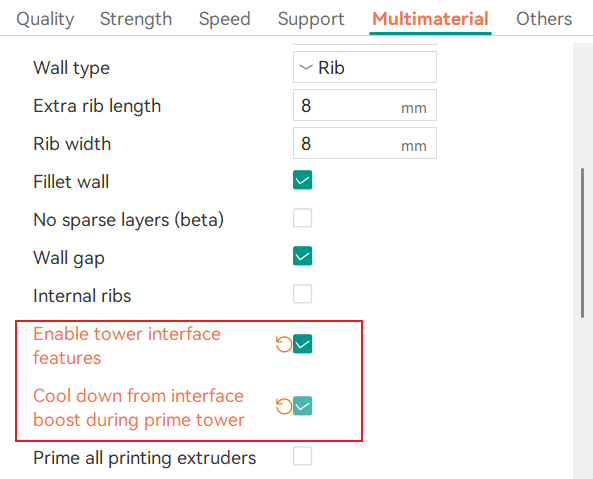
The Interface Layer Print Temperature refers to the nozzle temperature used when printing the interface layer of the Prime Tower. When this parameter is set to -1, the system automatically uses the maximum recommended print temperature for the filament. This feature requires the "Enable Tower Interface Features" option to be enabled. You can view the recommended nozzle temperature (minimum and maximum values) in the Filament panel.
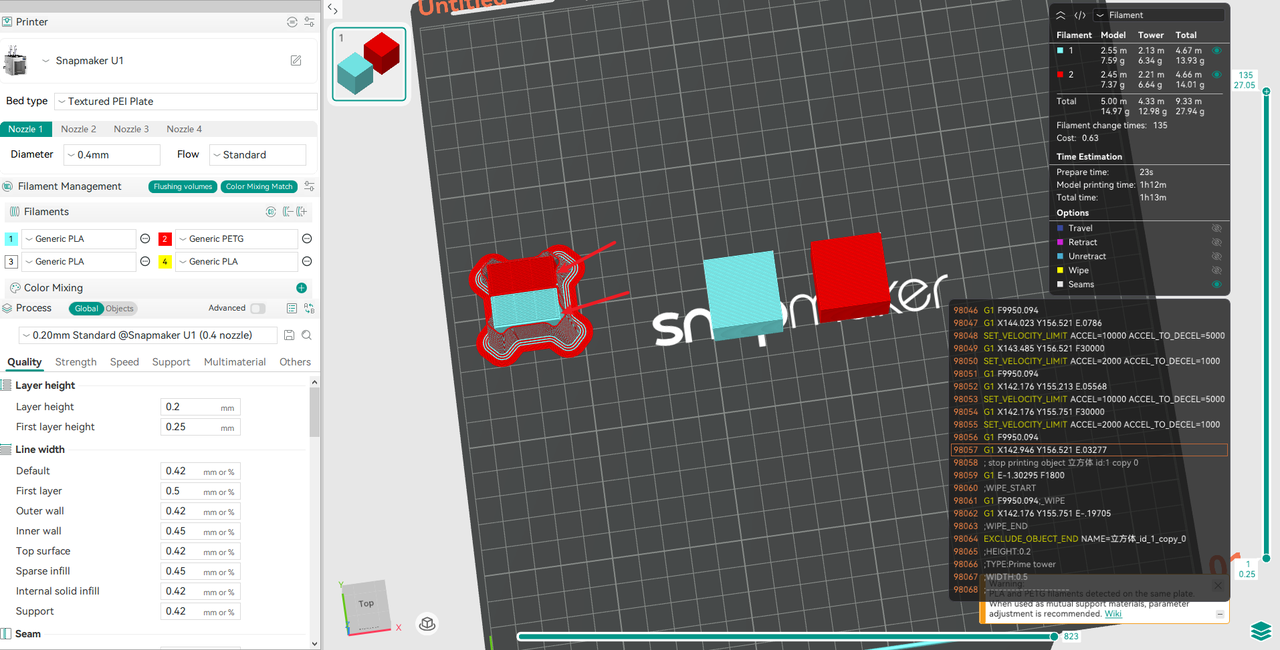
Adhesiveness Category
Since different filaments have different adhesion properties, the Adhesiveness Category parameter helps the software automatically partition the interior of the Prime Tower based on the material category, thereby improving Prime Tower stability. For example, when using PLA and PETG simultaneously, if you set the PLA category value to 100 and PETG to 300, the system will assign these two types of filaments to different areas of the Prime Tower (as shown in the figure: PLA is assigned to the lower section, while PETG is assigned to the upper section). This prevents the Prime Tower from collapsing due to poor adhesion between incompatible filaments.
-
Added two parameters to the Prime Tower panel:
Enable Tower Interface FeaturesandCool Down from Interface Boost During Prime Tower(visible in Developer mode).
-
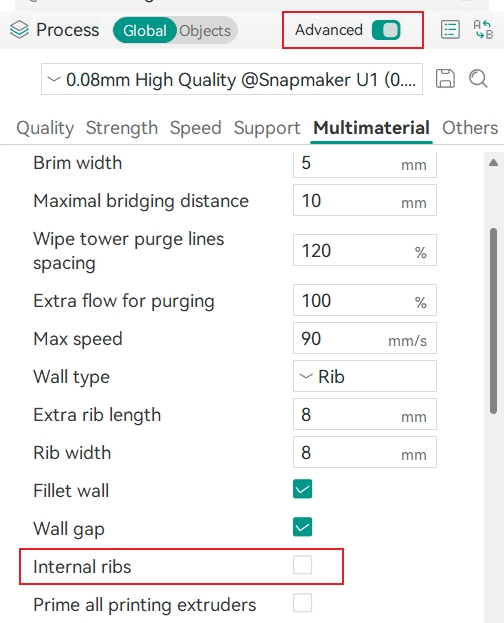
Added one parameter to the Prime Tower panel:
Internal Ribs(visible in Advanced mode).
-
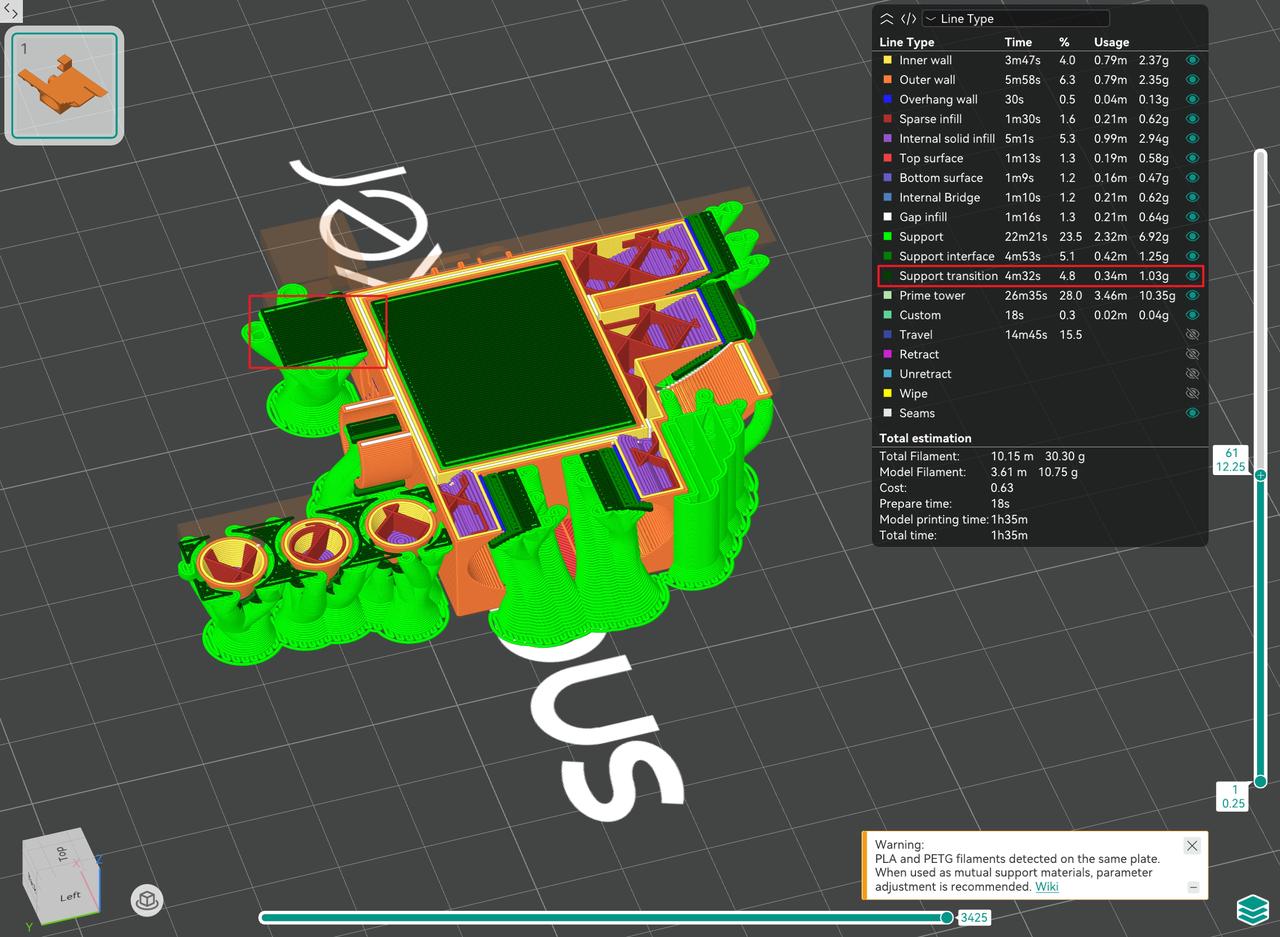
Added a tree Support Transition type with independent print speed and flow settings to improve support print quality.
-
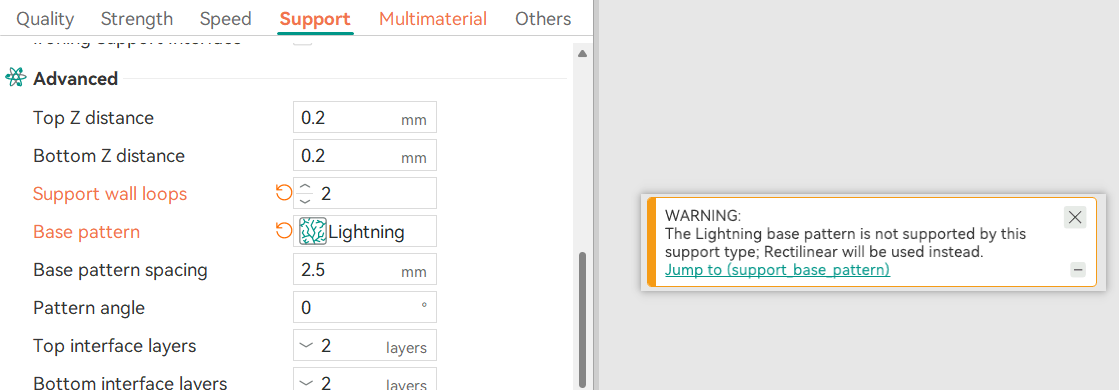
Added a support parameter validation prompt: when the support style is "
Organic" and the base pattern is set to “Lightning”, a pop-up warning will state that the “Lightning base pattern is not supported; Rectilinear will be used instead.”
-
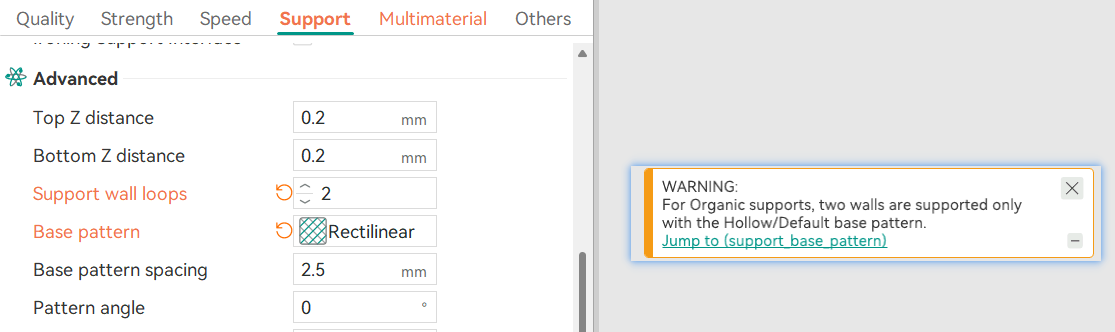
Added a support parameter validation prompt: when the support style is "
Organic", Support Wall Loops is set to 2, and the base pattern is non-default/hollow, a pop-up warning will appear.
-
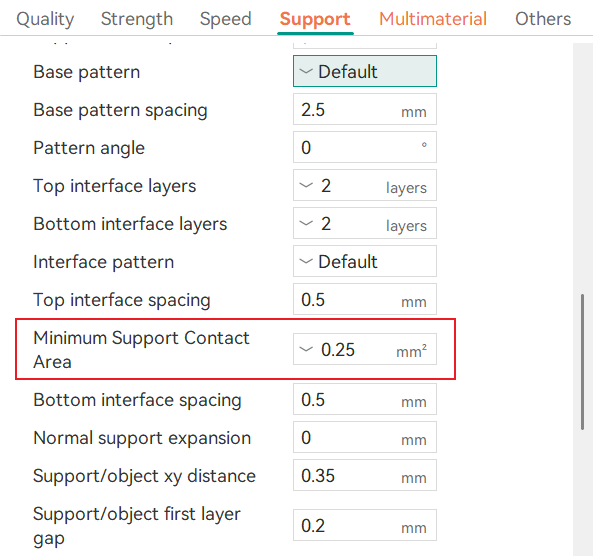
Added the "
Minimum Support Contact Area" parameter, which allows you to set an area threshold to determine whether a support interface is generated.
-
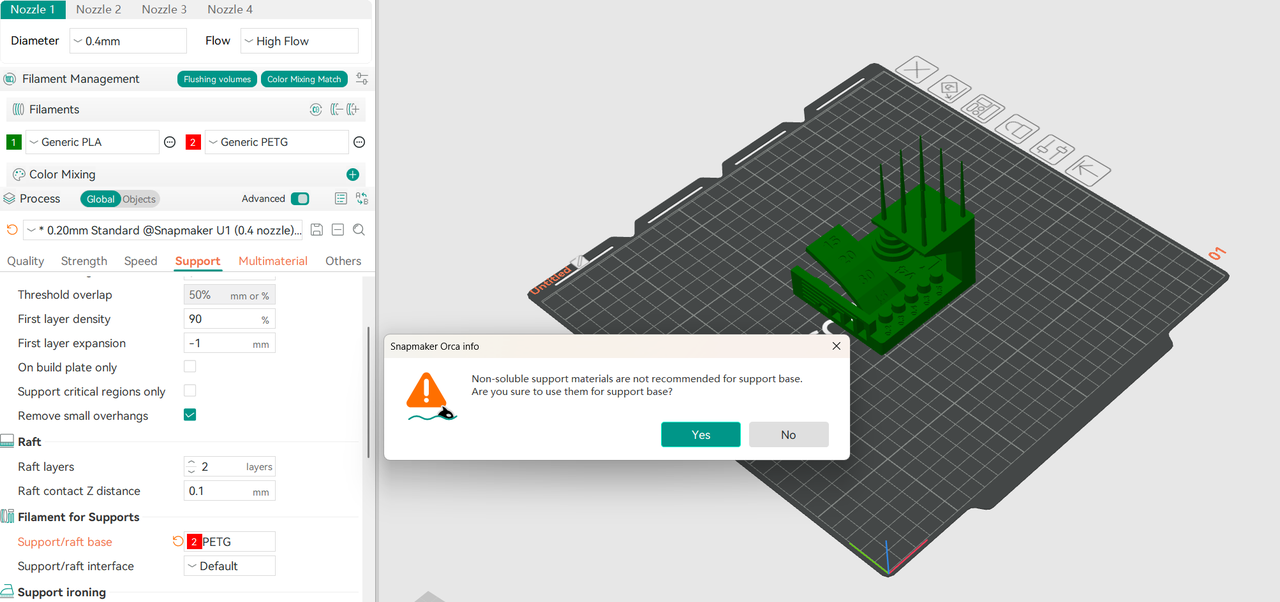
Added multi-filament support detection: when "
Support/Raft base" is set to a non-soluble material, a pop-up warning appears and allows you to reset it to "Default."
-
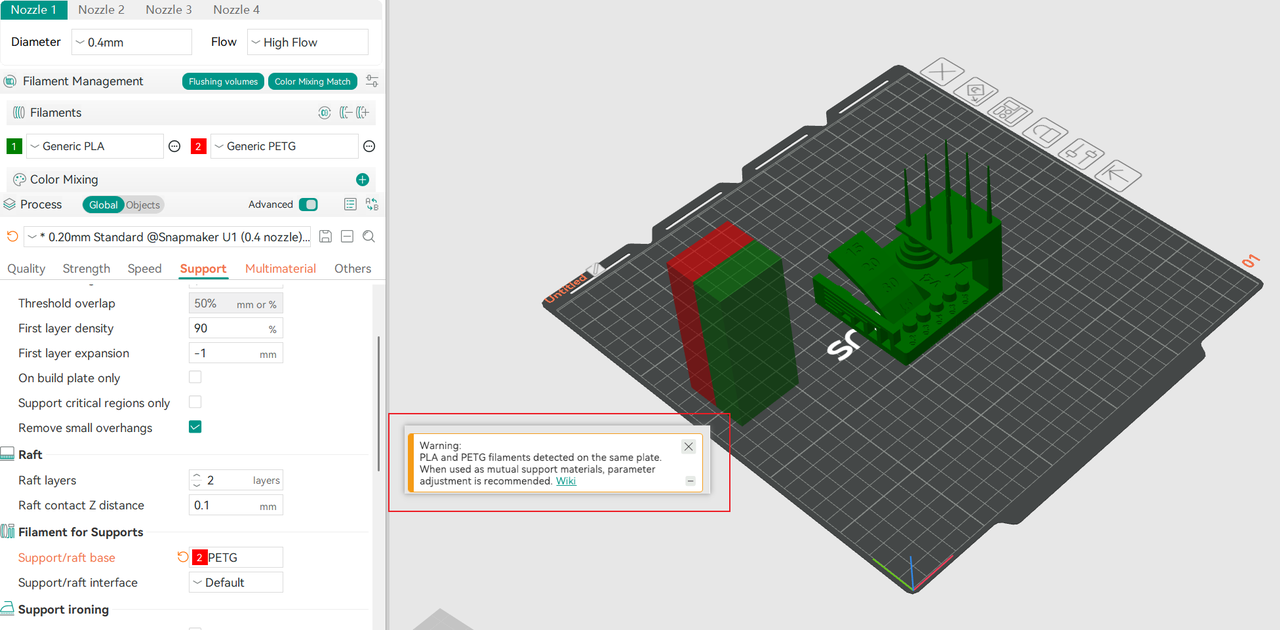
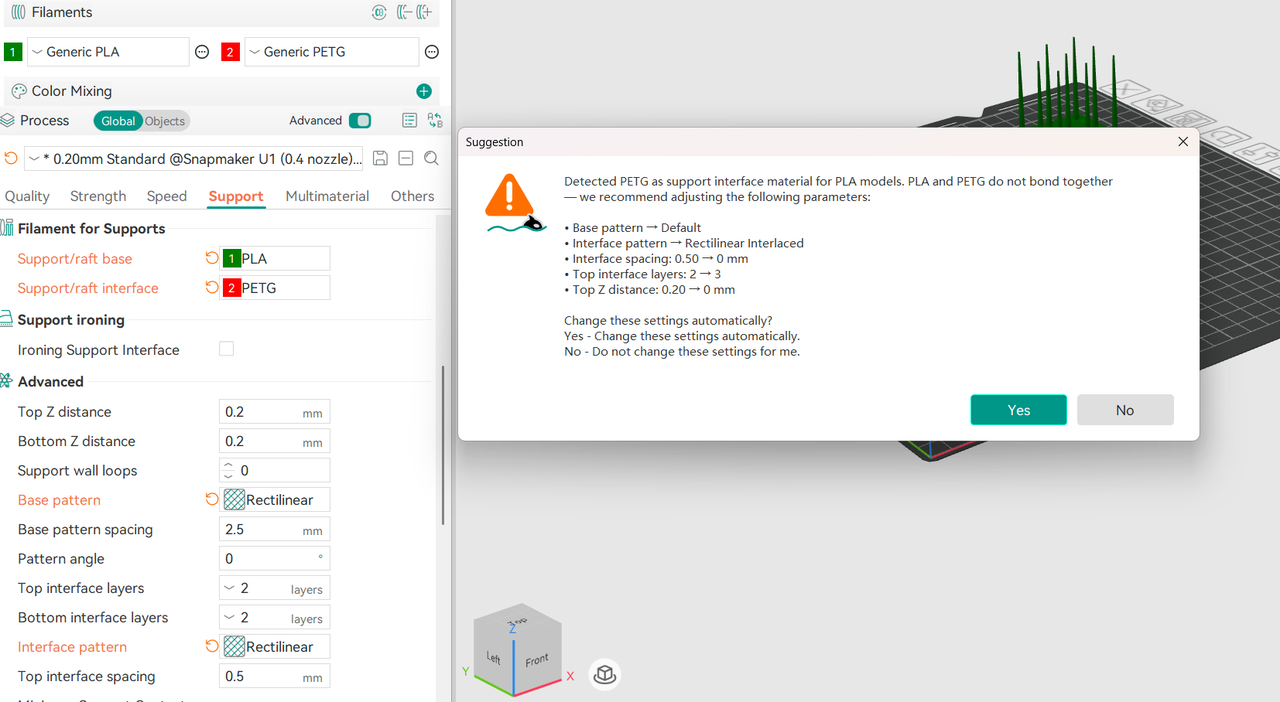
Added multi-filament support detection: when PLA/PETG are used as support for each other and the
Base patternorInterface patternis non-default, a pop-up prompts you to reset the parameters.
-
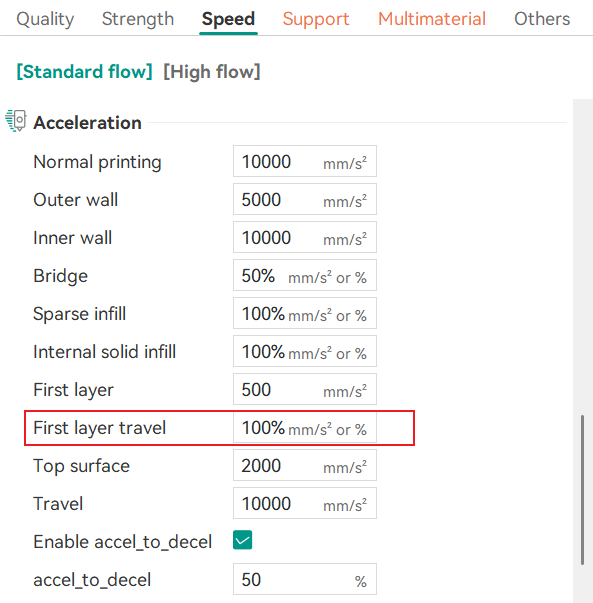
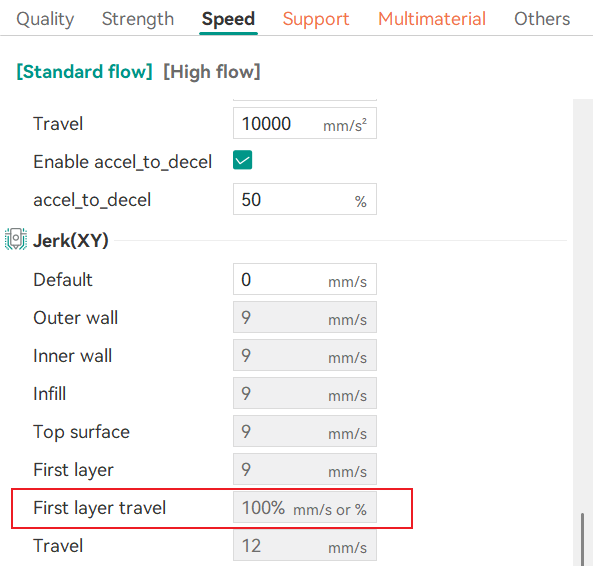
Added "
First Layer Travel" parameter under the Acceleration section; added "First Layer Travel" parameter under the Jerk (XY) section.
-
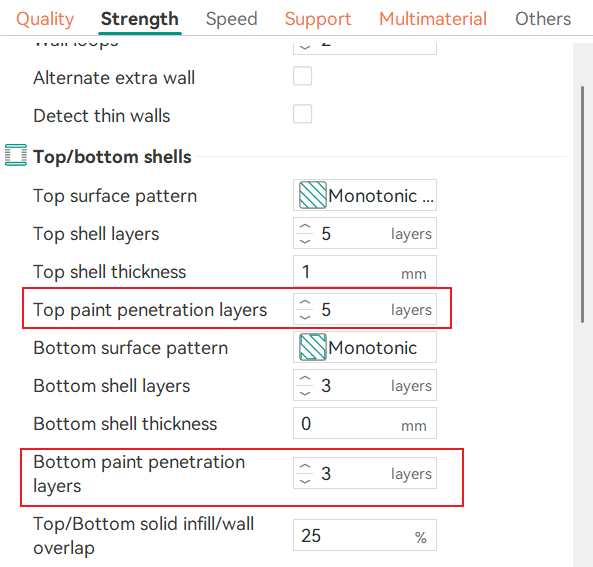
Added the "
Top/Bottom Paint Penetration Layers" parameter: configures how many layers the painted top/bottom areas penetrate into the infill, solving color bleeding when mixing light and dark filaments.
- Added multiple new colors for Snapmaker PETG HF filament. See the table below for details:
| Filament | SKU | Color Name | Hex Color Code |
|---|---|---|---|
| Snapmaker PETG HF | 34171 | Chestnut Red | #7E2D40 |
| 34172 | Sage Green | #A3B2A4 | |
| 34173 | Ice Blue | #B1E4E3 | |
| 34174 | Ocean Blue | #4EC3E0 | |
| 34175 | Iris Purple | #685BC7 | |
| 34152 | Apple Green | #9DF48F | |
| 34153 | Avocado Green | #436E42 | |
| 34154 | Aqua Blue | #53EECA | |
| 34155 | Cornflower Blue | #4895F9 | |
| 34156 | Navy Blue | #1A4E8A |
¶ Improvements
-
Optimized Prime Tower logic. Filaments are now automatically grouped by adhesion type, preventing mixing of materials with different adhesion properties and improving wiping tower stability.
-
Optimized Prime Tower preview on the
Preparepage: pre-slicing size of prime tower now closer to actual result; post-slicing shape matches the sliced result. -
Changed the default Prime Tower position from top-left to left-center.
-
Moved the "
No Sparse Layer" option to be visible in Developer mode. -
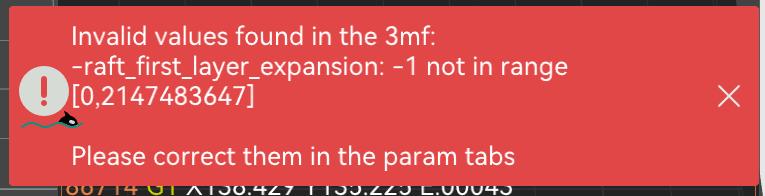
Changed the default value of "
First Layer Expansion" to -1 (Auto), with support for 0 (disable expansion) or ≥ 1 (expand outward).
Note: When opening a 3MF file created in V2.4.1 with an older version of Snapmaker Orca, an error prompt will appear as follows.
-
Changed the minimum support Threshold Angle to 1°.
-
Changed the "
Bridge Flow" default value from 0.8 to 1.0, and "External Bridge Density" default from 80 to 100. -
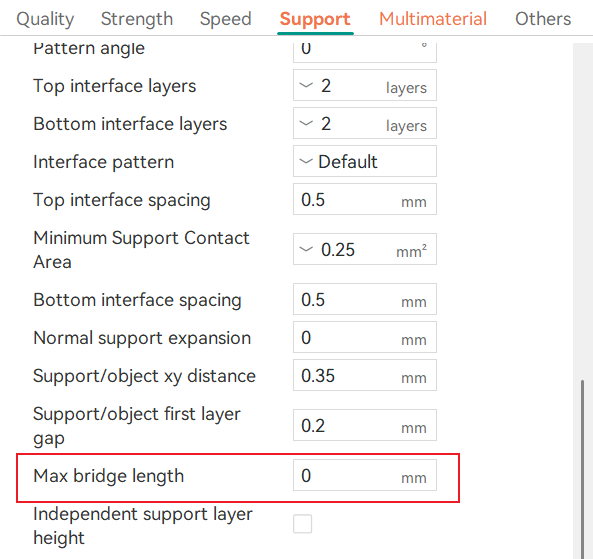
Changed the "
Max Bridge Length" default value from 10 mm to 0 mm, so that bridge areas can get full support by default.
-
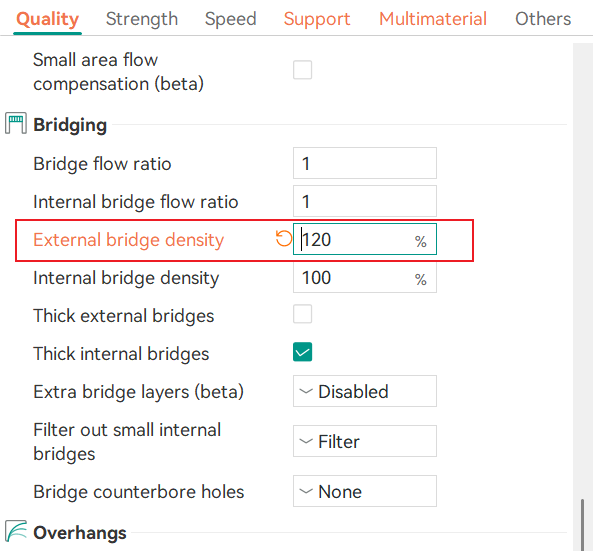
Raised the "
External Bridge Density" upper limit to 120% to improve bridge surface seam closure.
-
Optimized filament display on the
Preparepage: changed from a dropdown to a hierarchical menu for faster search and selection. -
Optimized the pop-up logic for High Flow Hot Ends: removed the unclear hover pop-up; now, when a high-flow hot end is detected, the filament grouping window pops up by default during slicing.
-
Optimized the G-code template to prevent nozzle collisions with the object during sequential printing, filament changes, or print pauses.
Thanks to Kuzuri for the contribution. Related PR: https://github.com/Snapmaker/OrcaSlicer/pull/453.
- Optimized the pop-up message for sequential printing collision risk.
- Optimized G-code preview rendering performance, improving responsiveness of interactions such as layer-height replay.
- Optimized graphics rendering performance, reducing context switching frequency and improving UI smoothness.
- Optimized model selection highlighting.
- Optimized loading efficiency and some UI text on the
Home,PreviewandDevicepages. - Optimized the user experience for software login and device connection.
- Optimized the bed temperature parameters for multiple filaments. See the table below for details:
Note: 0°C indicates that printing is not supported on this type of build plate.
| Filament (Nozzle Size) | Bed Type | Bed Temperature Change (Original → New) | Change Type |
|---|---|---|---|
| PETG Translucent (0.2/0.4/0.6/0.8 mm) | Graphic Effect Steel Plate | 80°C → 0°C | Disabled |
| PLA CF (0.4/0.6/0.8 mm) | Graphic Effect Steel Plate | 65°C → 0°C | Disabled |
| PVA (0.4/0.6/0.8 mm) | Graphic Effect Steel Plate | 65°C → 0°C | Disabled |
| PVA (0.4/0.6/0.8 mm) | Smooth PEI Plate | 65°C → 70°C | Increased |
| PVA (0.4/0.6/0.8 mm) | Textured PEI Plate | 65°C → 70°C | Increased |
| PLA Matte (0.6 mm) | Graphic Effect Steel Plate | 0°C → 65°C | Increased |
| PLA Matte (0.6 mm) | Textured PEI Plate | 45°C → 65°C | Increased |
| PLA Matte (0.8 mm) | Graphic Effect Steel Plate | 0°C → 65°C | Increased |
| PLA Wood (0.4 mm) | Graphic Effect Steel Plate | 65°C → 70°C | Increased |
| PLA Wood (0.6/0.8 mm) | Graphic Effect Steel Plate | 0°C → 70°C | Increased |
| PLA Translucent (0.2/0.4/0.6/0.8 mm) | Graphic Effect Steel Plate | 65°C → 70°C | Increased |
| Support for PLA (0.4/0.6/0.8 mm) | Graphic Effect Steel Plate | 65°C → 70°C | Increased |
| PLA Glow (0.4 mm) | Graphic Effect Steel Plate | 65°C → 70°C | Increased |
| PLA Snapspeed (0.6/0.8 mm) | Smooth PEI Plate | 55°C → 65°C | Increased |
¶ Bug Fixes
- Fixed an issue where exported 3MF files contained other brand fields; these have now been replaced with Snapmaker_orca brand fields.
- Fixed an issue in V2.4.0 where modifying the "
Small part" parameter underProcess>Object>Speeddisplayed an invalid error. - Fixed an issue in V2.4.0 where some 3MF files failed to parse after modifying object speed values and importing them into Orca.
- Fixed an issue where filament colors were displayed incorrectly in the statistics list on the Preview page when opening a G-code file in Orca.
- Fixed an issue where the interface displayed a Textured PEI Plate, but the actual plate was a low-temperature cold steel plate.
- Fixed an issue where colors could be missing when using filaments with IDs greater than 16.
- Fixed an issue where the Prime Tower preview size on the
Preparepage changed with the total number of filaments. - Fixed an issue where the model's first layer was incorrectly subdivided after enabling "
Subdivide Mixing Layers." - Fixed an issue where unused filaments were still displayed in the Prime Tower on the
Preparepage. - Fixed an issue where the outer wall opening parameter was still displayed after disabling the Prime Tower. The "
Brim chamfer" and "Max chamfer width" parameters have also been removed from the Prime Tower panel. - Fixed an issue where gaps appeared when the "
Wipe tower purge lines spacing" was set to a value other than 100%. The first layer purge lines spacing will now be executed at 100% to improve Prime Tower stability. - Fixed an issue where, during multi-plate multi-color printing, using
Ctrl+Zto undo restored the Prime Towers of all plates except the first plate to their initial positions. - Fixed an issue where the model skirt path overlapped with the Prime Tower skirt path.
- Fixed an issue where, for special models, elephant foot compensation caused the first layer to be missing after slicing.
- Fixed an issue where the "
Avoid interface filament for base" option under filament for supports did not take effect. - Fixed an issue where the first layer did not follow the "Inner/Outer/Inner" wall printing order.
- Fixed an issue where the actual effect of the support interface pattern conflicted with the "Default" setting.
- Fixed an issue where the infill pattern did not meet expectations when sparse
infill densitywas set to 100%. A prompt will now appear. - Fixed an issue where the cooling fan caused an abnormal drop in Z-axis height.
- Fixed an issue where
Pressure Advancestill took effect after being disabled. - Fixed an issue where gap fill was printed before outer walls.
- Fixed an issue where Boolean operations failed when some objects were mirrored.
- Fixed an issue where the "
Lock rotation" parameter for embossed text did not take effect. - Fixed an issue where the merge target was lost or pointed to the wrong filament when merging physical filaments into mixed filaments.
- Fixed an issue where object-level extruder and filament mapping was incorrect after deleting filament.
- Fixed an issue where the object list and layer height range were not refreshed after batch-cleaning unused filaments.
- Fixed an issue where the slicing status was not reset after all slicing was completed.
- Fixed an issue where the software crashed on startup when the TLS certificate override environment variable was not set.
- Fixed an issue where the build plate origin was not initialized, causing abnormal slicing coordinates.
- Fixed an issue where, after disabling the graphics card on Windows, opening Orca displayed a pop-up and the Prepare page was unavailable.
- Fixed an issue where the camera fit shortcut
Zdid not work on Linux. - Fixed an issue where, in multi-plate scenarios, deleting the plate being sliced during slicing caused the program to crash.
- Fixed an issue where the bed temperature in the G-code did not match the bed temperature configured in the Filaments settings.
- Fixed an issue where, with multiple objects using different filaments, setting the Skirt type to "
Per Object" only took effect for one object. - Fixed an issue where the "
Max bridge length" parameter did not correctly show/hide based on "Support type" and its value did not take effect. - Fixed an issue where sliced G-code still had gaps when "External bridge density" was set above 100%.
- Fixed an issue where Brim was lost for multi-color models when using painted Brim with "
Subdivide Mixing Layers" and "Full Domain" enabled. - Fixed an issue where non-SEMM Prime Towers did not support per-filament minimum purge amount. You can now configure the minimum purge amount separately in
Filaments settingsand on thePrime Tower pageand the larger value will be used. - Fixed an issue where colors were lost or bled after slicing multi-color 3MF files.
- Fixed an issue where the slow printing layer count was offset when using a
Raft. - Fixed slicing issues such as extrusion path interference and missing tree supports.
- Fixed an issue where support interfaces for certain model features could not form a continuous surface. A new overhang classification system has been introduced.
- Fixed an issue where abnormal mapping between
Organic Tree supportandRaftcaused empty layers in long pillars. - Fixed an issue where the contact area of normal supports was lost in Variable Layer Height mode.
- Fixed an issue where overhang layers were missing in the
Previewpage after slicing when "Partially Bridged" was selected for "Bridging Counterbore Holes." - Fixed an issue where flat models (top height = 0) could not generate supports properly.
- Fixed an issue where negative parts of some objects were lost after combining multiple objects and then splitting them.
- Fixed an issue where the first layer was missing after rotating a cube 45°.
- Fixed an issue where, after enabling
Raft, performing Variable Layer Height operations on the model, clicking "Adaptive" and then "Smooth Model" reset the layer height; fixed an issue where selecting "Organic" without enabling supports incorrectly displayed "Variable Layer Height not supported". - Fixed an issue where Orca did not recognize that one of multiple objects in a 3MF file had Variable Layer Height set.
- Fixed an issue where connection status was out of sync in multi-process LAN mode.
- Fixed an issue where Linux users' login status could not be saved.
- Fixed an issue where, after repeatedly clicking to download a time-lapse file, the status remained stuck at "Waiting for device upload".